Browser Extension
What It Does
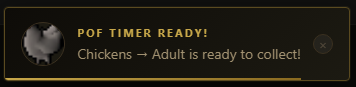
The RS Daily extension runs quietly in the background and syncs your PoF and RooT timers from this site. Once synced, you can close rsdaily.xyz and browse other tabs freely. When an animal is ready to collect, a toast notification pops up on whichever tab you have open.
No account required. All data stays in your browser.
Toast Alerts
A notification appears over your active tab the moment a timer expires. Any open Chrome tab will do — you don't need to stay on this site.
Sidebar Panel
A built-in sidebar shows all your active PoF and RooT timers with live countdowns. Once a timer is ready, it flips to an overdue counter so you know how long it's been waiting.
Auto Sync
Timers are synced from this site every 30 seconds while the tab is open. Once synced, you can close it freely. To pick up new or changed timers, just reopen the PoF or RooT page briefly.
Fully Local
Everything runs in your browser. No servers, no accounts, no data sent anywhere. Timers are stored locally and alarms are scheduled through Chrome — they even survive browser restarts.
Installation
The extension is not yet on the Chrome Web Store — install it manually in a few steps.
1
Download the latest release — grab the
.zip file from the GitHub releases page linked at the bottom of the page.2
Unzip the folder — extract it somewhere permanent on your machine. Don't delete it after installing.
3
Open Chrome extensions — go to
chrome://extensions in your address bar.4
Enable Developer Mode — toggle the switch in the top-right corner of the extensions page.
5
Load the folder — click Load unpacked and select the unzipped extension folder.
6
Pin it — click the puzzle piece icon in Chrome's toolbar and pin RS Daily for easy access.
Chrome may warn you about developer mode extensions on startup — this is normal for manually installed extensions. Click Keep to dismiss it.
How It Works
Once installed, the extension runs a background service worker that polls this site every 30 seconds for timer updates. When a timer expires, an alarm fires and a toast is injected into whatever tab you have active.
01
Visit this site — the extension reads your timers directly from the page's local storage.
02
Background sync — a service worker polls for changes every 30 seconds, even if the sidebar is closed.
03
Alarm scheduled — each timer sets a Chrome alarm for its exact end time. Alarms survive browser restarts.
04
Toast fires — when the alarm triggers, a notification toast is shown on screen. Click it to open the relevant timer page.
Source Code
RS Daily Extension
Open source — contributions and bug reports welcome